Assignments
The 3rd tab of the user management service is Assignments. It allows manually enrolling a user (student, parent, teacher, etc.) in one or more given classes or courses.
Manual assignments are added to automatic assignments, which are processed during the synchronization of your institution’s data (Timetable and parent files). A manual assignment will not be overwritten by synchronizations for your institution.
The Assignments tab shows the list of all people manually assigned to your institution.
Click on the Add an assignment button to enroll a person in a class.
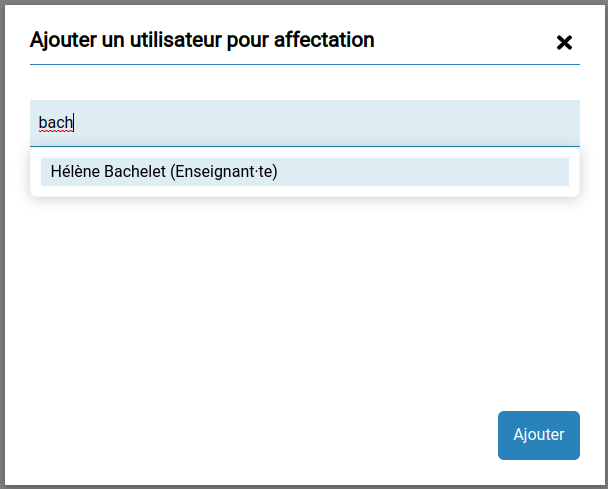
It is possible to add several people at once. Click on the Add button, the window closes and the added person or persons appear in the table.
Click on their name to assign them to one or more classes:
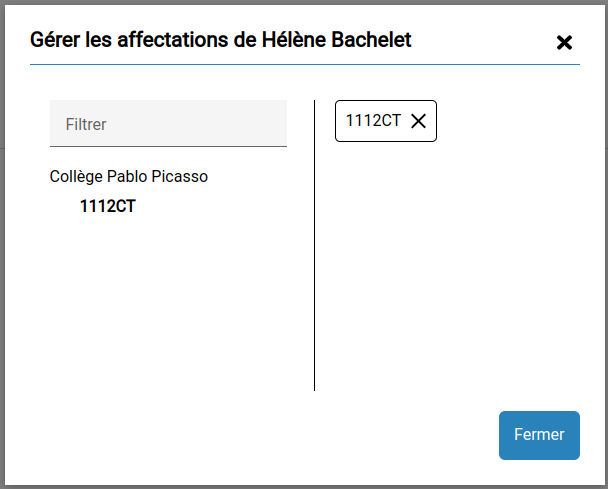
In the left column, the classes of your institution.
In the right column, the existing assignments of the selected person.
To add an assignment, simply click on the class, it will then be added in the right column.
To remove an assignment, click on the cross of the class.
Note that you can enroll a person in the institution, which has the effect of
- enrolling teachers in the group of teachers of the institution
- enrolling staff in the group of staff of the institution.
Once the assignments are modified, click on the Close button, back in the initial table you will see that the number of assignments is indeed modified.
If all assignments of a person have been removed, they will still appear with a number of assignments at 0, but on the next reload of the service, they will have disappeared from the list.